Did I get the show?
You marked your availability, the deadline passed, and now you want to know: did you get the show? There are four places to find out.
1. The lineup email
Section titled “1. The lineup email”When your manager finalizes casting, they send a lineup email. It lists the cast, your role, and the call time. This is usually the first thing you’ll see — it lands in your inbox the same day casting closes.
If you’re cast, your name is in the lineup. If you’re not, your name isn’t there.
2. The weekly lineup notification
Section titled “2. The weekly lineup notification”If you’ve turned on Weekly lineup notifications, you’ll get an email every week listing the shows you’re in for the next several days. No noise about shows you’re not cast in — just yours.
Turn it on under Notifications in your account menu. There’s a “Skip if I’m not in any shows” option if you’d rather only hear from us on weeks you’re actually performing.
3. The Lineups tab
Section titled “3. The Lineups tab”Open SchedgeHog and tap Lineups in the bottom nav. You’ll see every upcoming scheduled show at the theater. Toggle My Shows at the top to filter down to just the ones you’re cast in.
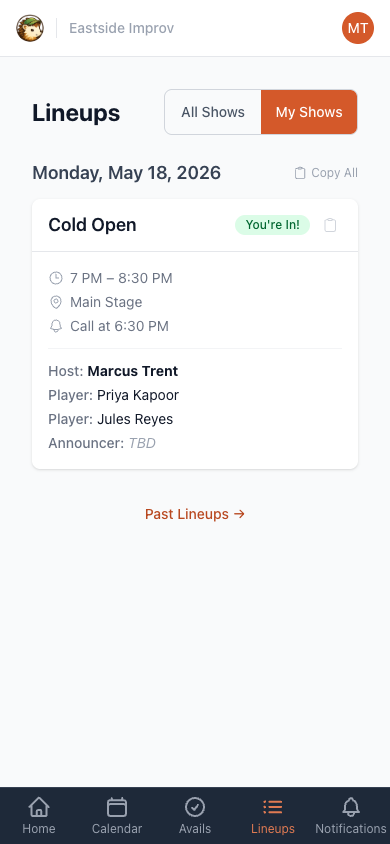
Each card shows the date, time, stage, call time, and the full cast with roles. A green You’re In! badge confirms you’re on the lineup.
If a show date hasn’t been finalized yet, it won’t appear here — the Lineups tab only shows lineups your manager has marked as scheduled.
4. Your dashboard
Section titled “4. Your dashboard”The first screen after you log in lists your upcoming shows. If a date is on your dashboard, you’re cast. Tap any show to see the full lineup.