Receiving a weekly lineup reminder
If you’d rather not refresh the app to find out when you’re next on, SchedgeHog can email you a personal weekly rundown — the shows coming up and the roles you’re cast in.
Turn it on
Section titled “Turn it on”- Open Notifications from the nav.
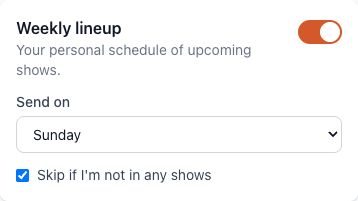
- Find the Weekly lineup card.
- Flip the switch on.
Pick the day it lands
Section titled “Pick the day it lands”Send on controls which day of the week the email goes out. Pick whichever day fits how you plan your week — Sunday if you sketch out the week ahead, Thursday if you just want a heads-up before the weekend.
Skip the quiet weeks
Section titled “Skip the quiet weeks”Check Skip if I’m not in any shows and SchedgeHog won’t send the email on weeks where you’re not cast in anything. Leave it unchecked if you want the reminder even when you’re off — some people use it as a confirmation that yes, they really have nothing coming up.
Turn it off later
Section titled “Turn it off later”Same place: open Notifications, find Weekly lineup, flip the switch off. Every weekly lineup email also has a Change preferences link in the footer that drops you straight onto this page.