Receiving a reminder before every show
If you’ve ever realized at 6 PM that you have a 7 PM show, this one’s for you. SchedgeHog can email you a heads up before every show you’re cast in — the morning of, the day before, or two days out — so the date doesn’t sneak up on you in the middle of a busy week.
Turn the reminder on
Section titled “Turn the reminder on”Open the Notifications tab from the nav and look for the Show reminders card. The toggle on the right starts off — flip it on.
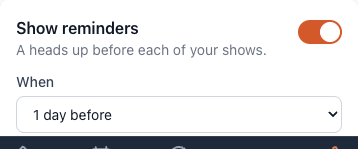
Changes save automatically — there’s no Save button.
Choose when it lands
Section titled “Choose when it lands”With the reminder on, the When dropdown sets how far ahead the email arrives:
- Morning of the show — for people who only need a same-day nudge, usually because the show is already on their calendar.
- 1 day before — a heads up the evening before, so you can pack your bag or rearrange dinner.
- 2 days before — the most lead time. Useful if you commute a long way or need to swap shifts.
You’ll get one email per show you’re cast in. If you’re in two shows on the same weekend, that’s two reminders.
Adjusting from the email itself
Section titled “Adjusting from the email itself”Every show reminder has a link at the bottom to manage your notification preferences. Click it and you’ll land right back on the Notifications page, where you can change the timing or turn the reminder off entirely.
Turn it off later
Section titled “Turn it off later”Same place: open Notifications, find Show reminders, flip the switch off. SchedgeHog won’t send any more show reminders until you turn it back on.