Receiving signup reminders
You don’t want to be the player who forgot. SchedgeHog can email you a heads up a day or two before the deadline to mark your availability, so a busy week doesn’t turn into a missed cast.
Turn the reminder on or off
Section titled “Turn the reminder on or off”Open the Notifications tab from the nav and look for the Availability reminder card.
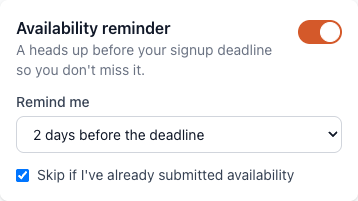
Use the toggle on the right to turn the reminder on or off. Changes save automatically — there’s no Save button.
Choose when it lands
Section titled “Choose when it lands”With the reminder on, the Remind me dropdown sets how far ahead the email goes out:
- 1 day before the deadline — for people who’d rather see it the night before, with everything else fresh on the calendar.
- 2 days before the deadline — the default. Gives you a working day to check work and family plans before answering.
- 3 days before the deadline — earliest. Useful if you travel a lot and want maximum lead time.
The reminder lists every upcoming show with a deadline that day, with your current response next to each one (Available / Unavailable / If needed / Not submitted), so you can see in one glance what still needs your input.
Skip it once you’ve already responded
Section titled “Skip it once you’ve already responded”The Skip if I’ve already submitted availability checkbox does what it says: if you’ve already marked yourself for every show in the batch, SchedgeHog won’t send the reminder.
Turn this off if you’d rather get the reminder either way — some players use it as a last-chance prompt to change their mind (“actually, work calmed down, I can do Saturday after all”).
Adjusting from the email itself
Section titled “Adjusting from the email itself”Every reminder email has a link at the bottom to manage your notification preferences. Click it and you’ll land right back on the Notifications page, where you can change the timing or turn the reminder off entirely.